Disclosure: some links in this post are affiliate links. If you buy through them, we may earn a commission at no extra cost to you. As an Amazon Associate, we earn from qualifying purchases. We only recommend gear we would put in our own trucks.
For anyone who drives for a living, dash cams are less a gadget than a liability tool. A recording settles a disputed fault claim in minutes, and disputed fault claims are where insurance premiums and business reputations get damaged.
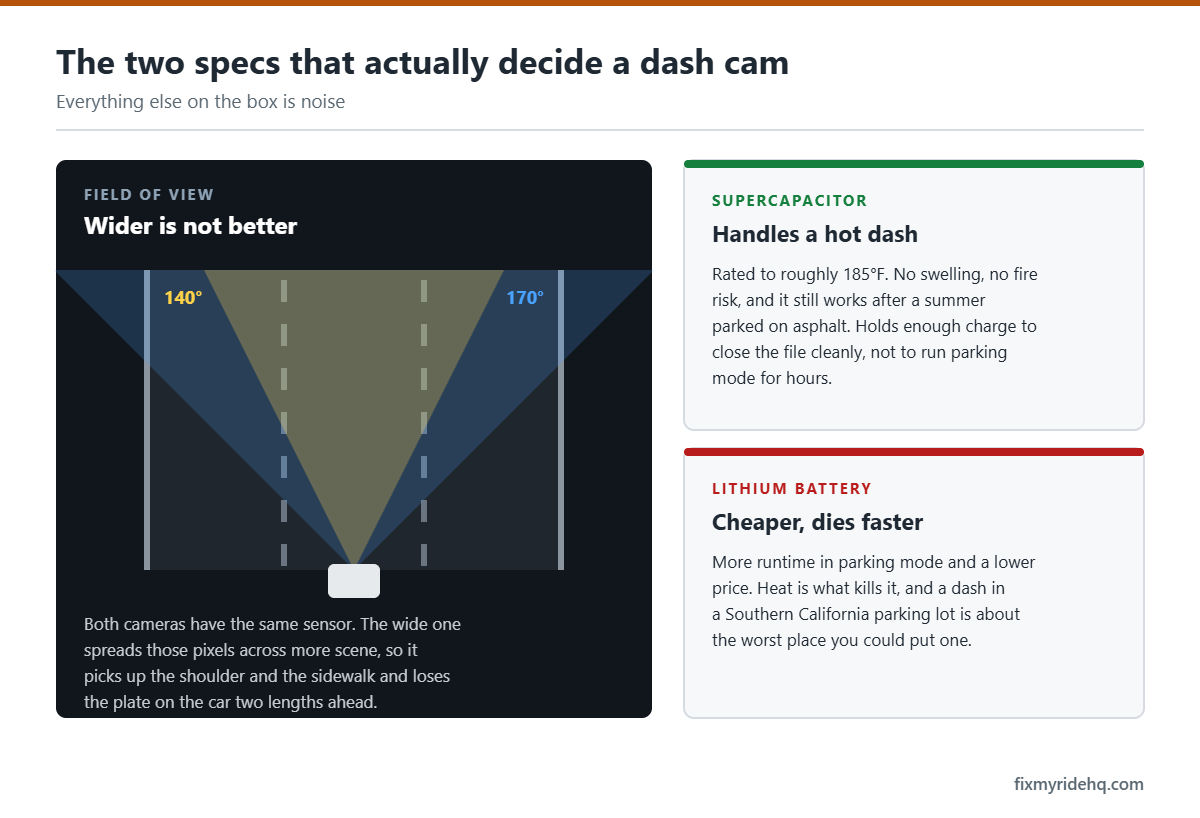
Two specifications decide whether a dash cam survives its first summer and whether the footage is usable when you need it. Neither is resolution, which is the number every product page leads with.
Here is what actually matters, followed by three cameras worth considering.
In this guide
- How we chose these
- Supercapacitor, not lithium — especially in heat
- The memory card is not an accessory
- Parking mode needs real power
- Resolution is not the whole story
- One channel or two?
- Three worth considering
- Side by side
- Mounting and the legal side
- Getting footage off the camera
- What to do after an incident
- Maintenance the manual does not mention
- Frequently asked questions
- The bottom line
Vince’s own photos and field notes for this guide are being added.
How we chose these
Selected on sensor and low-light performance, thermal design, parking mode capability, and the consistency of long-term owner reports. Where we have hands-on time with a unit it is noted. Where we do not, we say so.
Supercapacitor, not lithium — especially in heat
This is the specification that determines whether your camera is alive in three years.
Dash cams need a small internal power reserve to finish writing the current file when power is cut. That reserve is either a lithium-ion battery or a supercapacitor.
Lithium-ion cells degrade rapidly at high temperature and, in the worst cases, swell. A dash cam is mounted against a windshield, in direct sun, in a sealed cabin. Interior temperatures in a vehicle parked in Southern California summer sun climb far beyond what a consumer lithium cell is comfortable with. Failures show up as a camera that will not hold a charge, will not boot, or physically distorts.
Supercapacitors tolerate that environment far better. They store less energy — enough to close a file, not enough to run the camera independently — which is precisely all a dash cam needs. For any hot climate, treat supercapacitor as a requirement rather than a preference.
The memory card is not an accessory
A dash cam writes continuously and overwrites in a loop, which is one of the most punishing workloads you can give flash memory. A standard microSD card sold for phones and cameras will fail under it, often within months, and the failure is silent — you discover it the day you need footage.
Buy a high-endurance or industrial-rated microSD card, sold specifically for continuous video recording. Match the capacity to your camera’s maximum supported size and your recording resolution.
Then build two habits: format the card in the camera every month or two, and check that the camera is actually recording. A silently dead card is the single most common reason people discover they have no footage of the incident they needed.
high-endurance microSD card — Amazon link pending program approval
Parking mode needs real power
Parking mode records while the vehicle is off, which is what catches hit-and-runs in parking lots and break-in attempts. It is arguably the most valuable feature for a work vehicle, and it is also where installations go wrong.
A dash cam plugged into a cigarette lighter socket usually loses power when the ignition goes off, so parking mode does not function. Making it work requires constant power from one of two sources:
- Hardwire kit to the fuse box. Tidiest result, and the standard approach. Requires identifying a constant-power fuse and a switched fuse, plus a solid ground.
- OBD-II power cable. Plugs into the diagnostic port, no fuse tapping. Simpler, but occupies the port you use for a scanner — see our warning light glossary for why you want that port accessible.
Either way, the critical component is a low-voltage cutoff. This shuts the camera down when battery voltage falls to a set threshold, so parking mode cannot leave you with a dead battery. Without it, a camera recording overnight in a parking lot will absolutely flatten a battery — and then you need a jump start to fix a problem your dash cam created.
Parking mode comes in several flavors: motion detection, impact detection, time-lapse, and on premium models radar-based detection that wakes the camera faster and draws less power.
Resolution is not the whole story
4K sells cameras. What actually determines whether you can read a license plate is a combination of sensor quality, lens aperture, bitrate, and how the camera handles extreme contrast.
Sony STARVIS and STARVIS 2 sensors have become the benchmark for low-light performance in this category, and a 1440p camera with a good sensor and generous bitrate frequently out-resolves a cheap 4K camera at night. Night is when it matters — daytime footage is easy, and headlight glare against a dark plate is the hard case.
HDR or WDR handles the contrast problem: bright sky against shadowed road, or emerging from a tunnel. Without it, one or the other blows out.
One channel or two?
A front-only camera covers the majority of incidents. A second rear channel covers the rest, and for anyone driving commercially the rear camera earns its place quickly — rear-end collisions are common, frequently disputed, and the rear camera is the only witness.
Some setups add an interior-facing channel. That is worth thinking carefully about if you ever carry passengers: California treats recording confidential communications as requiring consent from all parties, and an interior microphone recording conversations raises questions that an outward-facing camera does not. Many drivers simply disable audio recording, which most cameras allow.
Three worth considering
VIOFO A229 Pro Duo
The value benchmark in the enthusiast end of the market. Sony STARVIS 2 sensors front and rear, supercapacitor power, and strong low-light performance for the money.
Good for: owners who want serious image quality without premium pricing, and who are comfortable with a slightly more technical setup experience.
Trade-offs: app and cloud features are less polished than the premium brands. Price tier: $$.
VIOFO A229 Pro Duo dash cam — Amazon link pending program approval
BlackVue DR590X
BlackVue built its reputation on fleet and commercial use, and the discreet tubular form factor sits tight against the windshield out of the driver’s sightline. Supercapacitor based, with a mature app.
Good for: commercial drivers who want a low-profile installation and a well-established ecosystem. The cloud-capable models in the range suit anyone managing more than one vehicle.
Trade-offs: generally costs more than comparable specifications elsewhere, and the cloud features that justify the premium usually involve a subscription. Price tier: $$ to $$$.
BlackVue DR590X dash cam — Amazon link pending program approval
Thinkware U3000
Near the top of the consumer market. Thinkware’s differentiator is radar-based parking surveillance, which detects motion without keeping the image sensor running — meaning lower power draw and faster wake than motion detection from video.
Good for: anyone whose priority is parking protection, particularly if the truck sits loaded or parked in the same spot regularly.
Trade-offs: most expensive of the three, and installation to get the most from parking mode is more involved. Price tier: $$$.
Thinkware U3000 dash cam — Amazon link pending program approval
Side by side
| Camera | Power reserve | Standout | Price tier |
|---|---|---|---|
| VIOFO A229 Pro Duo | Supercapacitor | Image quality for the money | $$ |
| BlackVue DR590X | Supercapacitor | Discreet form, commercial ecosystem | $$–$$$ |
| Thinkware U3000 | Supercapacitor | Radar parking mode | $$$ |
Mounting and the legal side
Mount the camera high and centered, typically behind the rearview mirror, where it has a clear view and stays out of your sightline. On a truck with a tall windshield, check that the mount clears the mirror housing and any rain sensor module.
Windshield mounting is regulated, and the rules vary by state. California restricts what may be attached to a windshield, permitting mounting only within limited areas near the lower corners or in a specific zone behind the mirror. Requirements change, so confirm the current rule for your state before you drill or adhere anything — the safest position legally is often not the position with the best view.
Route the cable into the headliner, down the A-pillar, and along the trim to the fuse box or power source. On vehicles with side curtain airbags in the A-pillar, route the cable so it cannot interfere with airbag deployment — behind trim but not across the airbag path. This is the one part of the installation where getting it wrong has real consequences.
Safety note: This guide is general information, not a repair manual for your specific vehicle. Your owner’s manual takes precedence over anything written here — specifications and intervals vary between manufacturers and model years. Improper cable routing can interfere with airbag deployment, and an improperly positioned camera can obstruct your view. If you are not confident routing wiring around airbags, have the installation done professionally. If you are not confident, have a qualified mechanic do the work.
Getting footage off the camera
Knowing how to retrieve a clip before you need one is worth five minutes of practice. There are generally three routes:
- Phone app over the camera’s own Wi-Fi. Fastest for a single clip at the roadside. Connect, browse, download, done. Practice this once in your driveway.
- Pulling the card and reading it on a computer. Best for large amounts of footage or when you need original files. Remember the camera is not recording while the card is out.
- Cloud upload, on models that support it. Convenient and useful for fleets, generally requires a subscription and a data connection.
The critical habit: lock or download the clip immediately. Dash cams loop and overwrite. Depending on card size and resolution, the window before your footage is overwritten can be hours, not days. Most cameras have a button or an impact sensor that marks a file protected — know which button it is without looking.
What to do after an incident
In order, once everyone is safe:
- Protect the file. Press the emergency record or lock button. The impact sensor usually does this automatically, but confirm rather than assume.
- Download a copy before you drive away if you can do it safely. Footage on one card in one camera in a vehicle that may be towed is not a backup.
- Note the time. Check that the camera’s clock is accurate — it drifts, and a wrong timestamp invites challenges to the footage. Make checking the clock part of your monthly card format routine.
- Do not edit the file. Provide the original. Trimmed or re-encoded footage is easier to dispute.
- Share it deliberately. Give it to your insurer or attorney. Posting footage publicly before a claim is settled can complicate matters.
For business driving this is the whole value proposition. A disputed fault claim that turns on two conflicting accounts becomes a five-minute conversation when there is a clear recording, and that difference shows up in your premiums and in whether a customer relationship survives.
Maintenance the manual does not mention
- Format the card in the camera monthly, and plan to replace it annually even if it seems fine.
- Confirm the camera is actually recording — glance at the indicator when you start the truck. Silent failures are the norm, not the exception.
- Check the clock after any power interruption or card change.
- Wipe the windshield in front of the lens. A film on the inside of the glass destroys night footage, which is exactly when you need it.
- In hot climates, check the mount adhesive periodically. Adhesive pads soften in heat and a camera that falls onto the dash records the headliner.
Frequently asked questions
Will a dash cam drain my battery?
Not while driving. In parking mode it draws from the battery, which is exactly why a low-voltage cutoff is essential. Set the cutoff conservatively, and if the truck sits for days at a time consider a time-lapse or impact-only parking mode rather than continuous recording.
Is 4K worth it over 1440p?
Sometimes, but sensor quality and bitrate matter more for reading plates at night. A well-implemented 1440p camera with a current Sony sensor often outperforms a budget 4K unit in exactly the conditions that matter. 4K also consumes card space and generates more heat.
How long does a memory card last in a dash cam?
A high-endurance card typically gives one to two years of continuous use, sometimes more. A standard card can fail within months. Format monthly, replace annually as a habit, and periodically confirm the camera is genuinely recording.
Can dash cam footage actually be used in an insurance claim?
Yes, and insurers generally welcome it. Footage that clearly establishes fault can resolve a claim far faster than competing statements. That value is the main reason commercial drivers fit them, and it applies equally whether the footage helps or hurts you — which is worth being aware of.
Do I need to tell passengers they are being recorded?
If you record audio inside the cabin in California, you are in the territory of two-party consent rules for confidential communications. Many drivers avoid the question entirely by disabling the microphone, which costs nothing for an outward-facing liability camera. This is general information, not legal advice — if this matters for your business, ask a lawyer.
The bottom line
Insist on a supercapacitor, buy a high-endurance card and format it regularly, and if you want parking mode, budget for a hardwire or OBD power source with a low-voltage cutoff. Prioritize sensor quality over headline resolution. A two-channel setup pays for itself the first time someone disputes a rear-end collision.
Next: roof racks and cargo carriers, or browse all accessory roundups.
Written by Vince T, who runs a delivery and logistics business in Southern California — dump runs, heavy hauling, private delivery. The trucks and SUVs covered here work through the week and get loaded up for the desert on the weekend. More about the site.