Disclosure: some links in this post are affiliate links. If you buy through them, we may earn a commission at no extra cost to you. As an Amazon Associate, we earn from qualifying purchases. We only recommend gear we would put in our own trucks.
Corroded battery terminals are one of the most common causes of a truck that cranks slowly, cranks once and quits, or simply does nothing when you turn the key. They are also one of the few problems you can fix completely in twenty minutes with materials you probably already own.
The fuzzy buildup on your battery terminals is not just cosmetic. It is an electrical insulator sitting directly in the path of the highest-current circuit in your vehicle — a starter motor can pull several hundred amps, and corrosion chokes that connection.
Here is how to clean it safely, what the color of the buildup tells you, and how to stop it coming back.
In this guide
- What the corrosion colors mean
- What you will need
- Safety first, briefly but seriously
- The order matters: negative first, always
- Step by step
- Confirming you actually fixed it
- Keeping corrosion from coming back
- Frequently asked questions
- The bottom line
Vince’s own photos and field notes for this guide are being added.
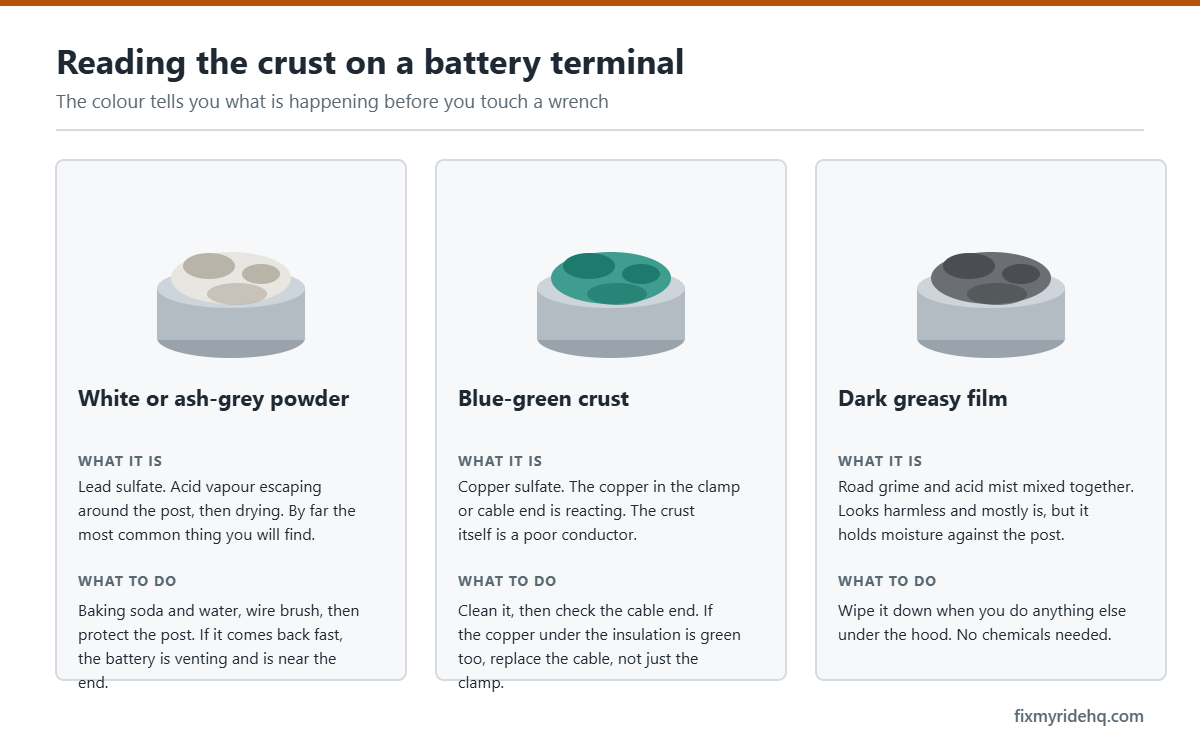
What the corrosion colors mean
The color is diagnostic, and most people never realize it.
- Green or blue, powdery. Copper sulfate. This forms on copper cable ends and clamps reacting with sulfuric acid vapor. Copper itself conducts beautifully; copper sulfate does not. Common and usually straightforward to clean.
- White or grayish, crusty. Lead sulfate, or zinc and aluminum compounds from the terminal hardware. Often appears on the lead posts themselves.
- Buildup mostly on the negative terminal. Frequently associated with undercharging — the battery is not getting brought fully back up, which can point at the alternator, a worn belt, or a lot of short trips.
- Buildup mostly on the positive terminal. More often associated with overcharging, which can indicate a failing voltage regulator.
That last distinction is worth acting on. If corrosion keeps returning on one specific terminal after a proper cleaning, the corrosion is a symptom and the charging system is the actual problem. Our warning light glossary covers what the battery-shaped dashboard light is really telling you — which is usually about the alternator, not the battery.
What you will need
- Safety glasses and gloves — this is not optional advice
- Wrench for the terminal clamps, commonly 10mm, 13mm, or 1/2 inch
- Baking soda and water, or a commercial battery terminal cleaner
- A stiff brush — a dedicated battery terminal brush is ideal, a stiff toothbrush works
- Rags and a small container of water for rinsing
- Dielectric grease, petroleum jelly, or anti-corrosion felt washers
- Optional: a multimeter, to confirm your work
battery terminal cleaning brush — Amazon link pending program approval
battery terminal protector spray — Amazon link pending program approval
Safety first, briefly but seriously
A car battery contains sulfuric acid and vents hydrogen gas. Both deserve respect.
- Wear eye protection. Acid in an eye is a permanent injury.
- No smoking, sparks, or open flame anywhere near the battery.
- Remove rings, watches, and metal bracelets. A ring that bridges a positive terminal to ground will heat to burning temperature almost instantly.
- Never let a metal wrench touch the positive terminal and any grounded metal at the same time.
- If the battery case is cracked, bulging, or leaking, stop. Do not clean it — replace it.
The order matters: negative first, always
This is the part people get wrong, and it is the whole reason the job can go badly.
Disconnecting: negative first, then positive. Once the negative is off, the vehicle chassis is no longer part of a complete circuit. If your wrench then slips and touches metal while you work on the positive, nothing happens. Reverse the order and that same slip creates a direct short across the battery, which can melt the wrench, burn you, or in the worst case rupture the battery.
Reconnecting: positive first, then negative. Same logic in reverse. You attach the positive while the ground path is still broken, then close the circuit last with the negative.
The phrase worth memorizing: negative off first, positive on first. It applies to cleaning terminals, replacing a battery, and — in a slightly different form — to jump starting.
Step by step
- 1. Engine off, keys out. On many modern trucks, have your radio code or infotainment settings handy if applicable.
- 2. Loosen and remove the negative clamp — marked with a minus sign and usually a black cable. Twist gently while lifting. Tuck it aside so it cannot spring back onto the post.
- 3. Remove the positive clamp — plus sign, usually red, often under a protective cover.
- 4. Inspect. Look at the cables themselves, not just the clamps. Green corrosion creeping up under the insulation means the cable is corroding internally and should be replaced rather than cleaned. Check for frayed strands and cracked insulation.
- 5. Mix the neutralizer. A tablespoon of baking soda in a cup of water. Baking soda neutralizes sulfuric acid, and you will see it fizz on contact with corrosion — that fizzing is the reaction working.
- 6. Scrub the posts and clamp interiors. Apply the solution, let it work for a minute, then scrub with the brush until you see clean, bright metal on both the posts and the inside surfaces of the clamps. The inside of the clamp is the contact surface and the part most often neglected.
- 7. Rinse carefully and dry completely. A little clean water, then dry thoroughly with rags. Keep the solution out of the battery vents.
- 8. Reconnect positive first, then negative. Snug the clamps so they cannot be twisted by hand. Do not overtighten — the posts are soft lead and will deform.
- 9. Protect the connection. A light coat of dielectric grease, petroleum jelly, or a purpose-made terminal spray on the outside of the finished connection. Felt anti-corrosion washers placed under the clamps work well too.
Confirming you actually fixed it
If you have a multimeter, two quick checks tell you whether the problem is solved:
- Resting voltage, engine off: roughly 12.6 volts indicates a fully charged healthy battery. Around 12.2 is about half charged. Below 12 suggests a battery that is discharged or failing.
- Charging voltage, engine running: generally in the 13.7 to 14.7 volt range. Substantially below that points at the alternator; substantially above suggests a regulator fault, which is the overcharging condition that eats positive terminals.
If the truck still cranks slowly after a thorough cleaning and the voltages look right, the battery itself is likely at the end of its life. Most last three to five years, and many auto parts stores will load-test one free of charge.
automotive multimeter — Amazon link pending program approval
Keeping corrosion from coming back
- Apply a protectant every time you disturb the terminals.
- Keep the battery top clean and dry — dirt and moisture form a conductive film that slowly discharges the battery.
- Make sure the hold-down bracket is tight. Vibration damages internal plates and loosens connections.
- Address chronic undercharging. Lots of short trips never fully recharge a battery, and a periodic top-up with a smart charger solves it.
- If corrosion returns quickly on the same terminal after a proper cleaning, have the charging system tested rather than cleaning it again.
Safety note: This guide is general information, not a repair manual for your specific vehicle. Your owner’s manual takes precedence over anything written here — specifications and intervals vary between manufacturers and model years. Battery acid causes chemical burns and batteries vent explosive hydrogen gas. Wear eye protection, remove metal jewelry, and never bridge the terminals with a tool. If you are not confident, have a qualified mechanic do the work.
Frequently asked questions
Can I use cola to clean battery terminals?
It does fizz, because the phosphoric acid in it attacks the corrosion. It also leaves a sticky sugar residue that attracts dirt and moisture, which is exactly what you are trying to eliminate. Baking soda costs less and does the job properly.
Do I lose my radio presets or settings?
On some vehicles, yes — presets, clock, and occasionally transmission adaptive learning. A memory saver plugged into the OBD-II port preserves them, or you can simply accept a few minutes of resetting.
Should I grease the terminals before or after connecting?
After. Grease between the clamp and post inserts an insulator into the connection. Make clean metal-to-metal contact first, tighten, then coat the outside of the assembled connection to keep acid vapor and moisture off it.
How tight should the clamps be?
Tight enough that you cannot rotate the clamp on the post by hand, and no tighter. Battery posts are lead, which is soft, and an overtightened clamp will distort the post or crack the case seal around it.
My terminals are clean but the truck still will not start. Now what?
Check the ground strap from the battery to the chassis and from the engine block to the body. A corroded ground produces identical symptoms to a corroded terminal and is far less obvious because nobody thinks to look at it.
The bottom line
Negative off first, positive on first. Scrub to bright metal on both the post and the inside of the clamp, protect the finished connection, and pay attention to which terminal keeps corroding — because a terminal that keeps fouling after a proper cleaning is telling you about the charging system, not about the terminal.
Next: how to jump start a truck safely, or the full maintenance schedule.
Written by Vince T, who runs a delivery and logistics business in Southern California — dump runs, heavy hauling, private delivery. The trucks and SUVs covered here work through the week and get loaded up for the desert on the weekend. More about the site.